Skip to content

Tag: CyberSecurity

What is Hashing?

In previous posts, I covered symmetric and asymmetric encryption. Both help protect information by making it unreadable without the correct key. Another term that often comes up alongside encryption is hashing. So, what is hashing, and where does it fit into cybersecurity?

Hashing Basics

Hashing takes an input, such as a message or a file, and calculates a value called a hash or digest. With an algorithm such as SHA-256, the output has a fixed length regardless of whether the input is a short sentence or a large download.

Think of it as a digital fingerprint. You can compare fingerprints to help check whether data has changed, without comparing every part of the original files yourself.

The same input produces the same hash when the same algorithm is used. Even a small change, such as replacing one letter, will usually produce a very different result. Secure cryptographic hash functions are also designed to make it impractical to recover an input from its hash or deliberately find two different inputs with the same hash. Such a matching pair is called a collision.

Hashing vs. Encryption

The main difference is their purpose:

  • Encryption protects confidentiality. Someone with the correct key can decrypt the information and read it again.
  • Hashing produces a digest for comparison. There is no decryption key that turns the hash back into the original message.

However, this does not mean that hashing makes a weak password impossible to discover. An attacker can hash likely guesses and compare the results.

Example Use Case: Checking a Download

Imagine you download a software installer and the publisher provides its SHA-256 hash.

  1. Download the file from the publisher’s official website.
  2. Calculate the SHA-256 hash of the downloaded file using a local tool.
  3. Compare your result with the hash published by the developer.

If the values differ, the file does not match the expected download. It may be incomplete, corrupted or modified.

A matching hash is only as trustworthy as the reference you compare it against. If an attacker replaces both the file and the published hash, that comparison alone will not expose the change. It also does not prove that the software itself is harmless.

How Does Hashing Help Protect Passwords?

A service should normally store a password hash rather than the password itself. When you sign in, the service uses a password verification function to check your entry against the stored result.

Password storage needs a dedicated algorithm, such as Argon2id, and a unique random salt for each password. A salt is stored alongside the hash and helps prevent identical passwords from producing identical stored results. Password hashing algorithms deliberately make guessing more expensive; a fast general-purpose hash such as SHA-256 alone is not suitable for storing passwords.

Why Does It Matter?

Hashing helps us check file integrity and is part of systems that verify passwords and digital signatures. It serves a different purpose from encryption, but both are useful building blocks for protecting information.

The next time you see a long SHA-256 value beside a download, you will know what it is there for: a way to compare the file you received with the file you expected.

Further Reading

Comments closed

What is CyScan.io


CyScan.io, also known as Cyber URL Scanner, is a simple online tool to check websites before you interact with them. Built by cybersecurity professionals, it does real-time scanning to detect threats hidden behind a link — malware, phishing traps or invasive tracking scripts.

With one click you get the full picture of a site’s safety — which is handy in today’s internet full of hidden dangers and deceptive links.


What is cool:

🔍 Real-Time URL Scanning

CyScan doesn’t give you a “safe/unsafe” score — it actively analyzes URLs to detect malicious code, phishing patterns, tracking technologies and other signs of risk. You get instant feedback so you can make smart decisions before clicking.

⚙️ No Setup Required

No account, no installation, no technical knowledge required. Just paste a link and get results. Whether you’re a developer, IT admin or casual user, this makes CyScan easy to integrate in your daily routine.

📊 Clean Reports

Results are presented in a simple way — no jargon, no PDFs. Just a summary of detected threats, categorized by severity, with details even non-techies can understand.

🧠 No Noise, Just What Matters

I really liked how focused and minimalistic CyScan’s reporting is. It doesn’t overwhelm you with technical data — just the essentials. You see what matters, and nothing more.


Who Should Use CyScan.io?

CyScan.io isn’t just for cybersecurity professionals. It’s useful for:

  • Individuals who want to check if a link is safe before clicking
  • Freelancers and web developers managing multiple websites
  • Digital agencies performing basic security hygiene for clients
  • Anyone who wants a quick and easy way to stay safe online

Final Thoughts:
CyScan.io isn’t a full-stack vulnerability scanner and it doesn’t pretend to be. But for quick and easy website safety checks it does exactly what it promises — and does it well. Whether you’re techy or not, it’s a tool to bookmark.

Comments closed

Asymmetric Encryption

Decrypt Everything: Understanding Asymmetric Encryption

Introduction:
In today’s digital world, protecting our data is crucial. Encryption plays a key role in keeping our sensitive information secure during transmission. Among the different encryption methods, asymmetric encryption stands out due to its unique approach and robust security features. So, what exactly is asymmetric encryption, and why is it so essential?

Encryption Basics:
Encryption is the process of transforming plain text into coded text, making it unreadable to unauthorized users. This ensures that only those with the correct key can decrypt and access the original information. There are two main types of encryption: symmetric and asymmetric. In symmetric encryption, the same key is used for both encryption and decryption. Asymmetric encryption, on the other hand, uses two keys: a private key and a public key.

What is Asymmetric Encryption?
Asymmetric encryption, also known as public-key cryptography, involves a pair of keys that are mathematically related: a public key and a private key. The public key is used to encrypt data, while the private key is used to decrypt it. The public key can be shared openly, but the private key must be kept secure. This ensures that even if someone intercepts the encrypted data, they cannot decrypt it without the private key.

How Does Asymmetric Encryption Work?
Here’s a simple breakdown of how asymmetric encryption works:

  1. Key Pair Generation: A pair of keys—a public key and a private key—is created.
  2. Public Key Distribution: The public key is shared with the intended recipient(s).
  3. Data Encryption: The sender encrypts the data using the recipient’s public key.
  4. Sending the Encrypted Data: The encrypted data is sent to the recipient over a secure channel.
  5. Data Decryption: The recipient uses their private key to decrypt the data and access the original information.

Example Use Case:
Imagine Alice wants to send Bob a private message. Bob shares his public key with Alice. Alice uses Bob’s public key to encrypt her message and then sends the encrypted message to Bob. Bob can then decrypt the message using his private key, ensuring that only he can read it.

Advantages of Asymmetric Encryption:
Asymmetric encryption offers several advantages over symmetric encryption:

  1. Enhanced Security: The use of two keys makes it more secure and harder for attackers to access the data.
  2. Public Key Distribution: Public keys can be shared widely without compromising the security of the private key.
  3. Digital Signatures: Asymmetric encryption enables digital signatures, which verify the authenticity and integrity of messages and documents.

Applications of Asymmetric Encryption:
Asymmetric encryption is used in various important applications:

  1. Secure Communications: Email encryption (e.g., Pretty Good Privacy, or PGP) uses asymmetric encryption to ensure message privacy.
  2. Digital Certificates and SSL/TLS: Protocols like SSL/TLS use asymmetric encryption to secure online transactions and communications.
  3. Blockchain and Cryptocurrency: Asymmetric encryption is crucial in blockchain technology and cryptocurrencies for securing and verifying transactions.

Challenges and Considerations:
While asymmetric encryption has many benefits, it also presents some challenges:

  1. Computational Demand: Asymmetric encryption requires more computational power than symmetric encryption, which can affect performance.
  2. Key Management: Safeguarding the private key is critical, as losing or compromising it can lead to data breaches.

Conclusion:
Asymmetric encryption is a fundamental component of modern cybersecurity. Understanding how it works and its various applications highlights its importance in protecting our digital world. As technology continues to evolve, asymmetric encryption will remain a vital tool in combating cyber threats, keeping our information safe and secure.

1 Comment

Vulnerability, Threat and Risk

Part of security teams duties is to check their systems, and they need to figure out how someone might try to break in. They would look for weak spots, possible dangers and things that could go wrong.

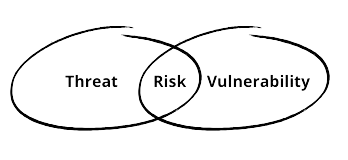
In this post I’ll speak about difference between Vulnerability, Threat And Risk.

  • Vulnerability is a weakness, or to put it simply, a flaw in a system that could be exploited to breach security. While there’s no such thing as a completely secure system, and we often see Zero-Day exploits (vulnerability before it’s patched) happening, we can at least try to protect our systems by applying the latest patches to firmware and software, as well as properly configuring the system and hardware.
  • Threat is possibility of someone or something exploiting a weakness to breach security,
    whether intentionally or unintentionally. The individual or thing responsible for threat is known as threat actor or threat agent. Attack vector is the pathway or method used by threat actors to breach a network.
  • Risk is the chance of using a weakness to break into a system. We need to assess these risks, which are vulnerabilities we find. Then, we can figure out how likely it is for a bad actor to exploit them and what damage that could cause.

For basic risk assessments, we can use a simple formula:

Risk = (Threat x Vulnerability ) x Impact
Comments closed